
Use Reader View to See a Web Page Without Ads
The AA icon will now be highlighted and the web page will be displayed without ads.
Use Reader View to See a Web Page Without Ads Read More »

Providing simple, straightforward answers to you iPhone and iPad questions.
The AA icon will now be highlighted and the web page will be displayed without ads.
Use Reader View to See a Web Page Without Ads Read More »
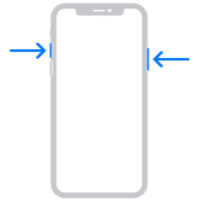
Tap Full Page near the top of the window. Then tap Done. You’ll be given options to save or delete the screenshot. The full page screenshot is saved as a PDF file in the Files app on the iPhone.
How to Screenshot an Entire Web Page on the iPhone Read More »

Apple provides the Safari app for browsing the Internet. For the most part, it is convenient and easy to use. Most of the browsing controls are easy to understand, but there are a few hidden features to make browsing a little easier. One such feature is the ability to view your browsing history. View
How to View the Browsing History in Safari on the iPhone or iPad Read More »
If you have multiple iOS devices such as an iPhone and an iPad, syncing Safari tabs allows you to see websites you visited on one device while using the other device. For example, say you were reading a very interesting article on the iAnswerGuy website while using your iPhone. Unfortunately, you were interrupted before you
How to Sync Safari Tabs Across Multiple iOS Devices Read More »
